📥 Contact Capture · Lead generation
Included in Unlimited $199+

Turn every QR scan into a qualified lead.

When someone scans your card, they can leave their own contact info too. Name, email, phone, company, GDPR consent. Everything lands in your admin dashboard, attributed to the right card. CSV export, one click.

The other person walked away. Now what?

Most digital cards are one-way: you give them your info, they give you nothing. For a sales rep at a trade show or a consultant at a networking event, that's a lost lead every single scan.

❌ Regular digital card

Visitor scans, sees your details, taps "Save contact." You have no idea who scanned. No way to follow up. After a trade show: hundreds of scans, zero leads in your CRM.

✓ With Contact Capture

Same scan, plus a form: "Want me to follow up? Leave your details." Visitor fills name, email, phone. Lead lands in your admin, tagged with rep name, scan time, and source card. CSV export → CRM, email tool, anywhere.

A real lead pipeline, built into the card

Not a third-party form embed. Not a Calendly link. Native to the plug-in, data stays on your WordPress.

📋

Configurable form fields

Default fields: name, email, phone, company, message. Add or remove fields per card. Mark which ones are required. Add a GDPR consent toggle that gets logged with the submission.

🎯

Auto-attributed to the right rep

Every card is tied to one person. When a lead submits the form, the lead automatically carries an "assigned to: [rep name]" field. After import to a CRM, leads route to the right owner — no manual assignment.

📤

One-click CSV export

Filter leads by date, card, source, or status. Export to CSV with one click. Load into HubSpot, Pipedrive, Salesforce, MailChimp, Excel, or any tool that reads CSV. Your data, your control.

From scan to dashboard in 10 seconds

No webhook setup, no API keys, no third-party service.

1

Enable on the card

In the card editor, toggle "Enable Contact Capture form." Pick which fields to show. Add a GDPR consent text if you need it. Save.

2

Visitor scans + submits

Someone scans your QR, sees your card, taps "Exchange contact" button. The form appears, they fill it out, hit submit. Done.

3

You see the lead in admin

In WordPress admin → QR vCard Pro → Contact Capture, you see the new lead with all details, scan time, source card, and rep attribution. Email notification optional.

What you can do with the leads

The dashboard is the start, not the end. Here's what every lead carries.

Full contact details the visitor chose to share (name, email, phone, company, custom fields)
Source attribution — which card was scanned, which rep owns it
Timestamp + location (country and city, when geolocation is allowed)
GDPR consent record with timestamp, for audit
CSV export filtered by date, card, or rep — load into any CRM
Email notification when a new lead arrives (optional, per card)
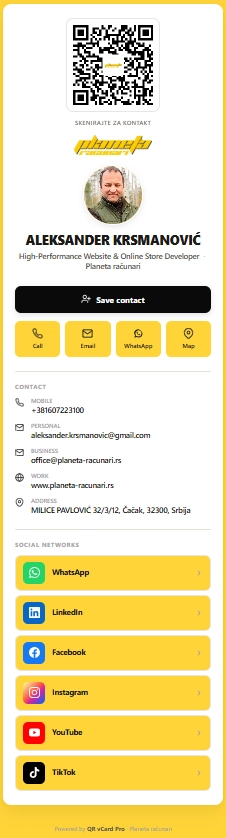
Live demo — author's card

Scan, leave your info, see Contact Capture in action

The plug-in is built and maintained by Aleksander Krsmanović. His own card runs on the same code you'd be buying. Scan it, save the contact, or just see how a real card looks on a phone.

planeta-racunari.rs/q/FejWtK

Common questions

How is this different from a regular contact form on my website?

A contact form sits on your website and waits for traffic. Contact Capture lives on the card itself — every scan is a potential lead, attributed to the specific card and rep that triggered it. Plus, the lead context (which trade show, which client visit, which event) is automatically captured via the source card.

Can I integrate with my CRM directly (webhook, API)?

Right now: CSV export handles 90% of cases. Filter leads by date or card, one-click export, drop into HubSpot/Pipedrive/Salesforce/MailChimp. Native webhook integration is on the plug-in roadmap. For custom real-time integration with proprietary CRMs, we offer consulting-based custom development.

Where does the data actually live?

In your own WordPress database, on your own server. We never see lead data. We only see your license key for validation. If you cancel support, leads keep coming in (the plug-in keeps working, just no more updates).

Is the form GDPR-compliant by default?

You can enable a GDPR consent toggle per card with custom consent text. The submission gets logged with consent status and timestamp. Since data lives on your WordPress, your existing privacy policy covers it — no third-party processor, no data transfer agreement needed.

How does the rep attribution work for a 50-person sales team?

Each rep gets their own card with their own QR. When the rep shares the card and someone submits the form, that lead is automatically attributed to that specific rep. After CSV export, the "assigned to" field routes the lead to the right owner in the CRM. No manual lookup.

Stop losing leads. Start capturing them.

$199 one-time for Unlimited tier. Contact Capture on every card, CSV export, unlimited sites, 24-hour support.

See pricing
14-day money-back guarantee. No subscription, no recurring fees.