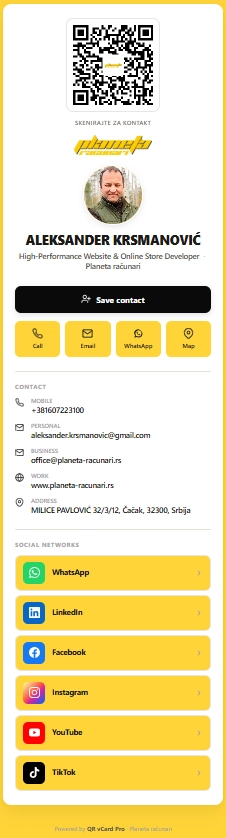
A digital business card you build inside WordPress, share via QR or short link, and update anytime without reprinting anything. Contact info, social links, custom buttons, all on a clean public page.
Printed cards have not changed in 30 years. They get lost, contact info goes stale, and updating them means a full reprint run. A digital card fixes all three at once.
Printed once, outdated forever. Wrong phone number? Order a new batch of 500. Missing your LinkedIn? Same thing. Average person throws away 88% of business cards within a week.
Update anytime in WordPress admin. New job? New phone? Add a social link? Save and the QR points to the latest version. The card itself never has to be reprinted.
Three things that separate this from a free QR generator or a $7/month subscription.
Drop your logo in the center of the QR code. It still scans, but now it looks like part of your brand instead of an anonymous square. Logo upload is one click in the card editor.
Every card gets a clean short URL like planeta-racunari.rs/q/FejWtK. You can share that link by SMS, email signature, social bio, or paste it into a chat. The QR code resolves to the same place.
Change your phone number in WordPress admin, and every printed QR pointing to the card now shows the new number. No reprinting, no re-issuing, no expired contact data.
No HTML, no design tool, no separate service.
In WordPress admin, click "QR vCard Pro → Add New". Fill in name, role, contact info, social links, custom buttons. Upload your photo and brand logo.
Save the card. The plug-in generates the QR code (with your logo in the middle) and a short link. Download the QR as PNG or SVG for printing.
Print the QR on a business card, a sign, a sticker, an exhibition booth. Or paste the short link into your email signature, social bio, or SMS. Same destination, multiple entry points.
Every feature below is in the plug-in today. No "coming soon," no upsell modal.
The plug-in is built and maintained by Aleksander Krsmanović. His own card runs on the same code you'd be buying. Scan it, save the contact, or just see how a real card looks on a phone.
planeta-racunari.rs/q/FejWtKNo. The card uses a clean default layout that already looks polished. You add your photo, logo, and content, and it renders correctly on every phone. If you want custom CSS for advanced styling, that's available too, but most users never touch it.
Yes. From Single tier ($49) and up, you get unlimited cards. Common use cases: one card per language, one card per event ("marko-conf-2026"), one card per role ("ceo" vs "investor-relations"). Each card has its own QR, short link, and analytics.
Update the card in WordPress admin. The QR code and short link stay the same. Everyone who scans it from now on sees the new info. Nobody has to throw away printed cards or reprint anything.
Yes, that's actually the most common setup. Print a minimal paper card (name, QR code, one line) and put everything else on the digital page. People scan the QR and instantly have all your social links, addresses, and call-to-action buttons.
The card page itself needs internet (it's a website). But the "Save contact" button generates a vCard file (.vcf) that gets saved to the phone's contact book — that part works offline forever. So the contact info survives even if your card page goes down or the visitor is offline.
$49 one-time for Single tier. Unlimited cards, branded QR, filter analytics, lifetime updates within version 1.x.
See pricing