🎨 Card design · 7 templates and a builder
Minimal and colors in every plan, other templates from Single Site ($49)

Your card does not look like your brand? You choose the template, colors and layout.

Seven templates, four colors with eight ready-made palettes, and Free layout, where you set the order, visibility and color of the elements yourself on the portal. The card content stays the same, so you can switch templates whenever you like.

No designer, but the card has to look professional? A ready template and a palette are enough to start.

A law office wants a restrained look, a design studio an expressive one, and a hotel or winery an elegant one. You choose the look once, and it applies to everyone who opens the card.

❌ The default look

A card in default colors and a default layout says more about the tool than about your company.

✓ A look that fits you

Pick one of seven templates, set four colors or click a ready-made palette, and in Free layout decide yourself what goes above what.

How much control do you need? From one click to a layout of your own.

The look is set in three places: the template sets the layout and style, colors are picked by hand or from palettes, and Free layout has its own builder on the portal.

🎨

Seven templates

Minimal is in every plan, and Business, Creative, Futura, Showcase, Editorial and Free layout come with Single Site. Business is restrained and centered, Creative expressive, Futura looks like an ID card, Showcase like a magazine cover, and Editorial uses elegant serif type.

🧩

Free layout

In the builder on the portal, you drag the twelve card elements by the ⠿ handle (touch works too) or move them with the arrows, hide what you do not need, and choose the background, accent and text colors, plus a separate color for four text elements.

🎯

Colors and ready-made palettes

Four colors: primary (text and headings), accent, page background and the Save contact button. Eight palettes, from Earth Tones to Personal Rose, fill in all four with one click. The colors take full effect in the Minimal template.

How do you change the look of a card? Template, colors, then a check on a phone.

The card content does not change: the same details are simply shown differently.

1

Choose a template

Under Card template, in the 1. Profile and details box (wp-admin) or the 1. Profile section (portal), click a template preview and save the card.

2

Set the colors or the layout

In 4. Design and colors (on the portal, 4. Landing page colors), choose colors or a palette. For Free layout, click 🎨 Open builder (arrange elements) on the portal.

3

Check the real card

The card editor has no live preview, and the builder preview is simplified. Open the card on a phone and check how it looks.

At a glance

Plan
All plans: the Minimal template, four colors, eight quick presets and portal branding. Single Site ($49): the Business, Creative, Futura, Showcase, Editorial and Free layout templates, and a shared logo in the center of the QR code. 5 Sites ($99): a separate QR code logo for each card, the virtual background and the vertical card. Agency: removing the credit from the card footer.
Where to find it
Template: the 1. Profile and details box (wp-admin) or the 1. Profile section (portal), under Card template. Colors: 4. Design and colors, on the portal 4. Landing page colors. Builder: on the portal, the 🎨 Open builder (arrange elements) button. QR code logo: QR vCard Pro → Settings → Branding.
Limits
The builder exists only on the portal, and its preview is simplified. The card editor has no live preview. All four colors apply only in the Minimal template. A QR code with a logo downloads only at 240 pixels.
What you need
For a logo in the QR code: a logo set in Branding; the screen recommends a square PNG of at least 200 × 200 pixels and up to 100 KB.
📖 Read the full step-by-step guide

What do you get when you set the look once? Cards, QR codes and a portal in your company colors.

The logo and color from Branding also carry over to the QR code, the Google Wallet pass and the portal.

✓
Switch templates without losing data: the same content, shown differently, whenever you like
✓
Eight ready-made palettes: Earth Tones, Corporate Blue, Forest Green, Royal Pink, Bold Red, Premium Gold, Dark Tech and Personal Rose
✓
A logo in the center of the QR code: from Single Site, one shared logo from Branding; from 5 Sites, a separate logo for each card
✓
Virtual background and vertical card (5 Sites): a PNG image with your QR code for video calls (16:9) and social stories (9:16), in HD or 4K
✓
A portal in your company colors: the portal name, logo and accent color employees see after signing in
✓
The builder works on phones: the drag handle works by touch
The author's real card

See a finished card on your phone

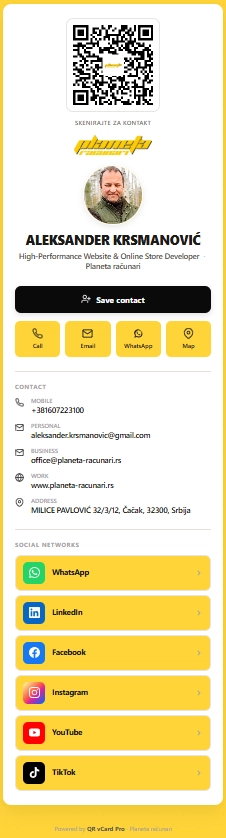
QR vCard Pro is built and maintained by Aleksander Krsmanović (Planeta računari), and this is his own card, made with the same plugin. Open it on your phone: save the contact, send the card on with Share details, or switch the language in the 🌐 picker.

planeta-racunari.rs/q/FejWtK

Frequently asked questions

Do I lose any data when I switch templates?

No. A template changes only the layout and style; the card content stays the same, so you can switch templates whenever you like.

What design options come with the free plan?

On the Personal plan and in demo mode, only the Minimal template is available, while the four colors and eight palettes work in every plan. Single Site ($49) unlocks Business, Creative, Futura, Showcase, Editorial and Free layout.

Where do I use the Free layout builder?

Only on the portal, after you first save the card with the Free layout template selected. If you choose that template in wp-admin, the card gets a default layout until you arrange it on the portal.

What cannot be moved in Free layout?

The cover image, Share details, Icon on phone display, the Google Wallet button, the Lead Capture banner and the Contact, Links, Gallery and Social media and links sections are not builder elements. They always appear below the arranged elements.

Do the colors I pick apply in every template?

All four colors apply only in the Minimal template. The other templates keep some of their own colors: in Business, Editorial and Futura, the Save contact button stays dark. Free layout uses the colors from the builder.

Can I download a QR code with my logo for print?

The code with the logo exists only at 240 pixels, in wp-admin, and is meant for screens and email. For print, use the code from the portal, without the logo, in the Large (1200×1200) or Print quality (2000×2000) size.

What happens to the design if I move to a lower plan?

The public card keeps the selected template. If you then choose Minimal in the editor, you cannot select the other templates again until you activate Single Site or a higher plan.

Can I remove the software credit from the card footer?

Only on the Agency plan: by turning off Footer credit in Branding, or by replacing the names through White-label. On Single Site, 5 Sites and Unlimited, the “Powered by QR vCard Pro · Planeta računari” line stays.
Want cards in your company colors? All seven templates come with Single Site.

Single Site ($49) gives you unlimited cards, all seven templates and your logo in the center of the QR code. Minimal and the colors also work on the free Personal plan.

See pricing
The license is lifetime and paid once. Updates are included for 12 months from purchase; after that, renewing updates is optional, and the plugin and every feature of your plan keep working without renewal. 14-day money-back guarantee: send your request to office@planeta-racunari.rs.