🔑 License · paid once
Personal is free; paid plans from $49

Don't want another monthly subscription? The license is lifetime and paid once.

The license is lifetime and paid once. Updates are included for 12 months from purchase; after that, renewing updates is optional, and the plugin and every feature of your plan keep working without renewal. The Personal plan is free, and you can request a refund within 14 days of purchase.

Don't want to pay for your card every month? The license is paid once, and you pick a plan by number of sites.

A subscription service bills monthly or yearly and keeps the data on its own servers. QR vCard Pro installs on your own WordPress, and you pay for the license once.

❌ A subscription service

A charge arrives every month or every year, and the cards, contacts and statistics sit on the service's servers.

✓ QR vCard Pro

One payment, no required subscription. The plugin runs on your site, your data is stored in your own WordPress database, and 12 months of updates are included in the price.

What exactly are you buying? A plan, a number of sites and 12 months of updates.

Each higher plan includes everything in the lower ones. The license server sets the plan based on the key you activate.

📦

Five plans

Personal is free forever: 1 site and up to 2 cards. Single Site ($49): 1 site and unlimited cards. 5 Sites ($99): up to 5 sites. Unlimited ($199) and Agency ($399): unlimited sites.

🔐

Signed updates

Before installation, every update package is checked: its size, SHA-256 fingerprint and digital signature against the vendor's key built into the plugin. If anything doesn't match, the update stops and the installed version keeps working.

🔁

Moving to another domain

On every plan: deactivate the license on the old site and activate the same key on the new one. Cards and data stay on the site where they were created.

How do you activate the license? A key, one button and a status check.

You activate it in the setup wizard or later, on the License tab.

1

Choose a plan

Get Personal for free with the Start free → button above the card list; buy a paid plan on this site, and the key arrives by email.

2

Activate the key

In QR vCard Pro → Settings → License, enter the License key in the QRVP-XXXX-XXXX-XXXX-XXXX format and click Activate license. The License step of the setup wizard does the same.

3

Check the status

After activation the tab header reads ACTIVE, and the Status and Tier rows show the state and the plan. You see the same in the License status notice at the top of every plugin page.

At a glance

Plan
Personal (free): 1 site, up to 2 cards. Single Site ($49): 1 site. 5 Sites ($99): up to 5 sites. Unlimited ($199) and Agency ($399): unlimited sites. Demo mode (no license): up to 3 published cards, plan features locked, no automatic updates.
Where to find it
QR vCard Pro → Settings → License (License key, Activate license, Re-check, Deactivate license, Check for updates); the setup wizard; the License status notice at the top of the plugin's pages. Only the Administrator manages the license.
Limits
The license is checked once a day. When the license server is unreachable, everything keeps working for another 7 days (grace period), after which the site switches to demo mode until the server responds again. In demo mode and on Personal, the card footer reads "Made with ... free · Try it →". Uploading a ZIP file by hand skips the signature check. On a WordPress network (Multisite), every site has its own license.
What you need
WordPress 5.8 or newer and a site address that starts with https://, so QR codes don't lead to an insecure address. For updates: an active license; new versions install from the Plugins screen.
📖 Read the full step-by-step guide

What can you count on? Terms written up front, with no fine print.

Everything that happens with your license, updates and data is described in the Complete guide.

✓
Paid once: no required subscription; the plugin and your plan's features keep working without renewing updates
✓
14-day money-back guarantee: send your request to office@planeta-racunari.rs within 14 days of purchase
✓
Existing cards work without a license: in demo mode, published cards and their QR codes keep working and can be edited
✓
Data stays when you change plans: after moving to a lower plan, cards, contacts and settings stay in the database
✓
Setup wizard: seven steps, from the license and branding to privacy, language and the license agreement
✓
Conflict detection: the plugin warns about known caching, security and multilingual plugins that can interfere with cards and tells you what to change
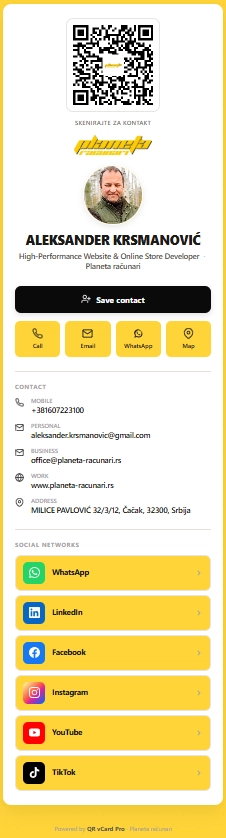
The author's real card

A real card, made with the same plugin you are buying

QR vCard Pro is built and maintained by Aleksander Krsmanović (Planeta računari), and this is his own card, made with the same plugin. Open it on your phone: save the contact, send the card on with Share details, or switch the language in the 🌐 picker.

planeta-racunari.rs/q/FejWtK

Frequently asked questions

What does "lifetime license" mean?

The license is lifetime and paid once. Updates are included for 12 months from purchase; after that, renewing updates is optional, and the plugin and every feature of your plan keep working without renewal.

How many sites can I use the license on?

Personal and Single Site on one site, 5 Sites on up to five, and Unlimited and Agency on an unlimited number of sites. The license server checks the number of domains according to the license agreement (EULA).

How do I move the license to another domain?

The same way on every plan: on the old site click Deactivate license, then activate the same key on the new one. If you don't deactivate before moving and the server doesn't accept the new domain, the site switches to demo mode. Deleting the plugin does not notify the license server, so always deactivate first.

What is demo mode, and what is Personal?

Demo mode means no active license: you can publish up to three cards, plan features are locked and there are no automatic updates. Personal is a free plan for 1 site and up to 2 cards on the whole site. In both cases, the features available on all plans work, such as the Marketing module, NFC cards, Google Wallet and the Odoo connector, and the card footer reads "Made with ... free · Try it →".

How do I know an update is genuine?

Before installation, the plugin downloads the package and checks its size, SHA-256 fingerprint and digital signature against the vendor's key built into the plugin, and whether your server meets the new version's PHP and WordPress requirements. If anything doesn't match, the update stops and the installed version keeps working. The signing keys are not on the license server, so even a break-in there could not slip you a modified package. That is why you should update from the Plugins screen, not by uploading a ZIP file by hand.

What happens if I move to a lower plan or deactivate the license?

Your data stays in the database: cards, contacts and settings. Higher-plan features stop working until you activate the matching plan again, and existing cards stay published. After deactivation, the site switches to demo mode immediately.

How does the refund work?

Within 14 days of purchase, send your request to office@planeta-racunari.rs, as set out in the license agreement (EULA).

What does the plugin send to the license server?

The license key, the plugin version and the site address: during the daily license check and the update check, at most once every 12 hours. It does not send visitor or contact data.
Want a card you don't pay for every month? Start free, then pick a plan by number of sites.

Personal is free; Single Site $49, 5 Sites $99, Unlimited $199, Agency $399. Paid once, 12 months of updates included, 14-day money-back guarantee.

See pricing
The license is lifetime and paid once. Updates are included for 12 months from purchase; after that, renewing updates is optional, and the plugin and every feature of your plan keep working without renewal. 14-day money-back guarantee: send your request to office@planeta-racunari.rs.