🏷️ White-label · Agency plan only
Agency plan only ($399)

Setting up cards for clients as your own service? White-label changes the software name in the admin and the credit on cards.

On the Agency plan you enter the plugin name, description, your company name and website, a support address and a menu icon. Your client sees them in WordPress Plugins, the menu, the Home screen and the "Powered by" credit on cards, and you can remove the card footer credit entirely. Some places keep the original names, and every one of them is listed here.

Your client sees someone else's name in their own WordPress? With White-label, they see yours.

When an agency installs a tool for a client, every outside name in the menu, the plugin list or on a card raises the question of who is behind the service and who to call for help.

❌ Someone else's name everywhere

The plugin list shows the original vendor, the support link points to them, and every card footer says "Powered by" with their name.

✓ With White-label

In the Plugins list the plugin carries your name, description and author, the "Support" link leads to your page, the menu shows your name and icon, and the card credit reads "Powered by [software name] · [your company]", or is gone.

What exactly changes? Three places your client and visitors see.

White-label works only when three conditions are met: an Agency license, the Enable white-label switch turned on, and a Plug-in name entered.

🧩

WordPress admin

The name, description, author and links in WordPress Plugins, plus a "Support" link; the name and icon of the main menu item; the Home and Settings screen titles and the name of the Complete guide.

🏷️

The card

The "Powered by" credit in the footer of the public card shows your software name and your company name. On Agency, the Footer credit switch in Branding removes the credit entirely.

✉️

Notifications and support

The subject of the new contact email starts with your name in square brackets, and the client's administrator sees your support address at the top of the Complete guide.

How do you turn it on? One tab, a few fields, then a check in the plugin list.

Only the Administrator sets up White-label, in wp-admin. The portal uses the Portal name from Branding.

1

Turn it on and name it

In QR vCard Pro → Settings → White-label, turn on Enable white-label and enter the Plug-in name (up to 60 characters). Without a name, nothing changes.

2

Fill in your details

Your name (vendor), Your website (vendor URL), Support email and Support / docs URL, so no credit or link points to the original vendor. Add a menu icon if you like.

3

Align the rest

In Branding, enter the Portal name and, if you want, turn off Footer credit. Also align the WordPress site name, because employee emails, invitations and reviews use it.

At a glance

Plan
Agency only ($399). On lower plans the tab is locked. If the license stops being active or you move to a lower plan, everything reverts to the original names automatically, and the fields you entered stay saved.
Where to find it
QR vCard Pro → Settings → White-label, wp-admin only; card footer credit: QR vCard Pro → Settings → Branding → Footer credit.
Limits
These stay original: the setup wizard, the "License status" notice and the card limit message, page titles in the browser tab, the new version details window, the portal Home subtitle and the first sign-in greeting, the footer of the card sharing email, the Verified badge description ("Verified by Planeta računari"), the license agreement text and links to the license server and the purchase page. The Branding step of the setup wizard always turns Footer credit back on.
What you need
An active Agency license and the Your name (vendor), Your website (vendor URL) and Support / docs URL fields filled in; empty fields leave the original vendor's name and addresses in place.
Details in the Complete guide
📖 Read the full step-by-step guide

What does your agency get? A service your client associates with you.

For help, the client turns to you, not to the software vendor.

✓
Your name in WordPress: in the Plugins list, the menu, the Home screen and the name of the Complete guide
✓
Your credit on the card: "Powered by [software name] · [your company]", or no credit at all by turning off Footer credit
✓
Your support: the "Support" link in the Plugins list and the support address at the top of the Complete guide lead to you
✓
Your menu icon: a dashicons icon or the address of your own small SVG or PNG image
✓
Safe to switch off: the switch restores the original names while the fields stay saved, so you turn White-label back on without re-entering anything
✓
The whole Agency plan: along with White-label, Team, Card Manager, team email signatures, CSV import of employees and Bulk Import of cards
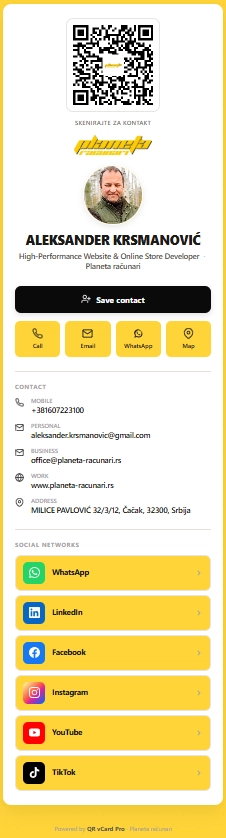
The author's real card

See the credit in the real card's footer, which Agency changes or removes

QR vCard Pro is built and maintained by Aleksander Krsmanović (Planeta računari), and this is his own card, made with the same plugin. Open it on your phone: save the contact, send the card on with Share details, or switch the language in the 🌐 picker.

planeta-racunari.rs/q/FejWtK

Frequently asked questions

Does White-label remove every mention of the vendor?

No. It changes the software name in the WordPress admin, the "Powered by" credit on the card and the subject of the new contact email. These stay original: the setup wizard, the "License status" notice, page titles in the browser tab, the new version details window, the footer of the card sharing email, the Verified badge description, the license agreement and links to the license server. The full list is in the Complete guide.

What does the Verified badge say when White-label is on?

On mouse hover, the badge reads "Verified by Planeta računari", even when you use White-label. The badge is not tied to a plan: it shows only while the license is active and verified, and the vendor verifies the license.

Can I remove the credit in the card footer?

Yes, on the Agency plan only: in Branding, turn off Footer credit. On lower plans the credit shows even when the switch is off. Check the switch after every rerun of the setup wizard, because its Branding step turns it back on.

Does White-label change the portal?

The portal bar and sign-in form use the Portal name from Branding, where you also choose the portal logo. The guide on the portal carries your name. The portal Home subtitle and the first sign-in greeting stay original.

What happens if the Agency license stops being valid?

Everything reverts to the original names automatically, and the fields you entered stay saved. As soon as you activate Agency again, White-label works as before, with nothing to re-enter.

Can I use a different brand for each client?

White-label is set per installation, on the client's site. The Agency plan allows an unlimited number of sites, and on each one you enter the name and details for that client. On a WordPress network (Multisite), every site has its own license and its own settings.

Who can see and change White-label?

Only the Administrator, in wp-admin. Card Managers, employees and team members don't see this tab.
Want your client to see your name in their WordPress? White-label is part of the Agency plan.

Agency ($399): White-label, removal of the card footer credit, Team, Card Manager, team email signatures, CSV import of employees and Bulk Import.

See pricing
The license is lifetime and paid once. Updates are included for 12 months from purchase; after that, renewing updates is optional, and the plugin and every feature of your plan keep working without renewal. 14-day money-back guarantee: send your request to office@planeta-racunari.rs.