🔗 Integrations · Webhooks + Zapier
Included in Unlimited $199+

Send every lead to any CRM — without writing code.

QR vCard Pro fires a real-time webhook the moment a contact is received, a card is created, or a scan is recorded. Connect it to Zapier and you have a bridge to 6,000+ apps: HubSpot, Pipedrive, Salesforce, Google Sheets, Mailchimp and more. No developer required.

Your leads are stuck in WordPress. Your CRM is empty.

Capturing a lead is only half the job. If it never reaches the tool where your team actually works, the follow-up is slow, manual, and easy to forget.

❌ Manual export, every time

A lead comes in, sits in the admin dashboard, and waits. Someone has to remember to export a CSV, clean it, and import it into the CRM. Hours later — or never. By then the lead has gone cold.

✓ With Webhook integration

The instant a lead arrives, a webhook pushes it to Zapier, and Zapier creates the contact in your CRM — in seconds, automatically, in real time. Your team follows up while the lead is still warm.

A real integration layer, built into the plug-in

Not a fragile screen-scraper. Signed, retried, real-time HTTP delivery from your own WordPress.

Real-time webhooks

Three events: contact.received (a new lead), card.created (a new card), scan.recorded (a scan or save). Each fires an HTTP POST with a clean JSON payload to any URL you choose. Delivery is asynchronous and retried on failure.

🔗

Bridge to 6,000+ apps via Zapier

Point a webhook at a Zapier "Catch Hook" and you instantly reach HubSpot, Pipedrive, Salesforce, Google Sheets, Mailchimp, Slack — anything Zapier supports. Map the fields once, leads flow forever. Zero code.

🔒

Signed & self-hosted

Every call is signed with HMAC-SHA256 (X-QRVP-Signature header), so the receiver can verify it genuinely came from you. The data lives on your WordPress — no third-party processor sees your leads.

From lead to CRM in three steps

Set it up once. It runs forever, in real time.

1

Create a webhook

In WordPress admin → QR vCard Pro → Webhooks, click Add webhook. Choose the contact.received event (or all events). The plug-in generates a secret key for signing.

2

Connect Zapier

In Zapier, create a Zap with the "Webhooks by Zapier → Catch Hook" trigger. Copy the URL Zapier gives you, paste it into your webhook, and run a test so Zapier learns the fields.

3

Map to your CRM

Add an action step for your CRM (e.g. HubSpot "Create or Update Contact"). Map data.email, data.name, data.phone, data.company onto the CRM fields. Publish the Zap. Done.

📖 Read the full step-by-step guide

What the integration gives you

Everything needed to wire QR vCard Pro into the tools you already use.

Three events — contact.received, card.created, scan.recorded
Real-time delivery — leads reach your CRM in seconds, not after a manual export
6,000+ apps via Zapier — HubSpot, Pipedrive, Salesforce, Sheets, Mailchimp, Slack and more
HMAC-SHA256 signature — every call is signed so the receiver can verify authenticity
Self-hosted — data flows from your WordPress; no middleman sees your leads
Automatic retries — failed deliveries are retried, with delivery ID and attempt headers
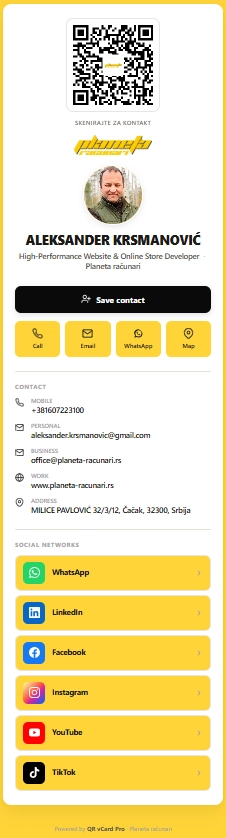
Live demo — author's card

See the webhook fire live from this card

The plug-in is built and maintained by Aleksander Krsmanović. His own card runs on the same code you'd be buying. Scan it, save the contact, or just see how a real card looks on a phone.

planeta-racunari.rs/q/FejWtK

Common questions

Which CRMs can I connect to?

Any CRM that Zapier supports — which is essentially all of them: HubSpot, Pipedrive, Salesforce, Zoho, Close, Copper, and thousands more. You can also skip the CRM entirely and send leads to Google Sheets, Mailchimp, Slack, or a custom endpoint. If a tool is on Zapier, you can reach it.

Do I need a developer or to write code?

No. The webhook is created with a few clicks in the admin, and Zapier connects it to your CRM through a visual interface — no code at all. We provide a step-by-step guide. Writing a custom receiver (instead of Zapier) is optional and only for advanced setups. Read the full step-by-step guide →

How secure is the webhook?

Each delivery carries an X-QRVP-Signature header containing an HMAC-SHA256 hash of the exact body, signed with your webhook secret. A receiving endpoint can verify this to confirm the call genuinely came from your site. The Zapier "Catch Hook" URL is itself secret, so the basic flow is safe out of the box.

Which tier do I need?

Webhooks are available from the Unlimited tier ($199 one-time) upward. That tier also includes unlimited sites, event lead capture, and 24-hour priority support. The Agency tier adds white-label and team features on top.

What happens if a delivery fails?

Delivery is asynchronous and retried automatically on failure. Each call carries a unique delivery ID and an attempt counter, so you can trace exactly what was sent and when. On low-traffic sites we recommend a real system cron for instant delivery (WP-Cron otherwise fires on page visits).
Stop exporting CSVs. Automate the whole pipeline.

$199 one-time for the Unlimited tier — webhooks, unlimited sites, event lead capture, and 24-hour support.

See pricing
14-day money-back guarantee. No subscription, no recurring fees.