💳 Google Wallet · your card in the wallet
In every plan, including the free Personal

A client looks for you a week later? Your card is waiting in their Google Wallet.

QR vCard Pro creates a Google Wallet pass for every card. Visitors add it with the Add to Google Wallet button on your card, and employees add their own cards from the portal. The Administrator connects the company's issuer account once.

Your card link gets buried in messages? A pass in the wallet stays in one place.

After a trade fair or a meeting, a client has dozens of links and photos, and your card should be at hand when they decide to get in touch.

❌ A link among messages

The link to your card sits somewhere in messages or browser history, and a few days later the client has a hard time finding it.

✓ A card in Google Wallet

A pass with your name, position, phone, email and company sits in the phone's wallet, next to boarding passes and loyalty cards, and its QR code and link open your up-to-date card.

What exactly does the pass carry? Contact details only, nothing financial.

The pass is a digital card in the Google Wallet app and has nothing to do with the payment cards in the wallet.

💳

What the pass contains

The title is the company name from the card, followed by the name and position, the Phone, Email and Company fields with the first phone number and first email from the card, a QR code to the public card and the Open business card link.

🎨

The look comes from Branding

The background color and logo come from Branding and are the same for all the company's passes; the color and logo of individual cards are not used.

👥

For visitors and for the team

The Add to Google Wallet button sits below the save contact button on all public cards, and portal users add their own cards on the Google Wallet page.

How do you turn on Google Wallet? Once, for the whole company.

Only the Administrator sets it up, and employees enter nothing. The first two steps are also explained inside the plugin, on the Guide tab.

1

The issuer account

In the Google Pay & Wallet Console, signed in with the company's Google account, activate the Google Wallet API, create an Issuer and copy the Issuer ID.

2

The service account

In the Google Cloud Console, create a service account with access to the Google Wallet API, link it to the issuer and download a JSON key.

3

Connect and test

In QR vCard Pro → Google Wallet, Connection tab, enter the Issuer ID and the service account email and private key, click Test key, turn on Enable Google Wallet pass and try the button on an Android phone.

At a glance

Plan
All plans, including the free Personal.
Where to find it
QR vCard Pro → Google Wallet (Connection and Guide tabs); on the portal Google Wallet; on the public card, the Add to Google Wallet button.
Limits
A pass that has already been saved does not update itself. Until the issuer has production access from Google, passes carry the [TEST ONLY] label and work only for test users. The button cannot be shown or hidden per card. On the portal, everyone sees only their own cards (up to 20). The software creates Google Wallet passes only.
What you need
A company Google account with an issuer in the Google Pay & Wallet Console, a service account in the Google Cloud Console with a JSON key, and the OpenSSL PHP extension on the server.
Details in the Complete guide

What do you get with Google Wallet turned on? One more place where clients find you.

The feature works in every plan, and the company enters the issuer details only once.

✓
In every plan: Google Wallet has no plan check and works on the free Personal plan too
✓
One setup for everyone: the Administrator enters the issuer details, and employees enter nothing
✓
A button on every card: one switch shows or hides it on all public cards
✓
Your brand on the pass: the logo and color from Branding, the same for the whole team
✓
Always the current details: the QR code and link on the pass open your card, where the details are up to date
✓
A check before you switch it on: Test key checks OpenSSL on the server, the filled-in fields and the key
The author's real card

Open the kind of card a pass's QR code opens

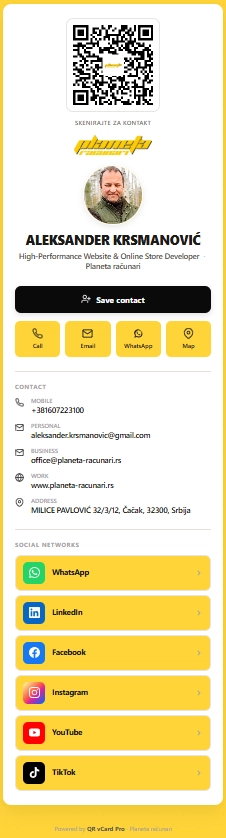
QR vCard Pro is built and maintained by Aleksander Krsmanović (Planeta računari), and this is his own card, made with the same plugin. Open it on your phone: save the contact, send the card on with Share details, or switch the language in the 🌐 picker.

planeta-racunari.rs/q/FejWtK

Frequently asked questions

Does Google Wallet require a higher plan?

No. Google Wallet works in every plan, including the free Personal. You need an issuer account with Google, a service account and the OpenSSL PHP extension on the server.

Does the pass work on an iPhone?

The software creates Google Wallet passes only. iPhone users save your card with the Save contact button on the public card.

Does the pass update itself when I edit the card?

No. The software does not send Google changes to passes that have already been saved, so the details in someone else's wallet do not change on their own. The QR code and link on the pass always open your card, where the details are current.

Why do the passes say [TEST ONLY]?

That is Google's rule: until the issuer is granted production access, which you request in the Wallet Console, passes carry the “[TEST ONLY]” label and work only for test users. Check the issuer status in the console before wider use.

Can I hide the button on public cards?

Yes. The Show the "Add to Google Wallet" button on the public card option applies to all cards at once; it cannot be set per card. When you turn it off, portal users can still add their own cards from the portal.

Who enters the Google details, and what is sent to Google?

Only the Administrator, once for the whole company: the Issuer ID, the service account email and the private key, which is used only to sign passes. Employees enter nothing. The software exchanges the details the pass carries with Google, while cards and contacts stay in your own WordPress database.

What does the Test key button check?

Only your server: whether the OpenSSL PHP extension is there, whether all three fields are filled in and whether the key can be read. The test does not contact Google, so check the Issuer ID and the link between the service account and the issuer with a test pass on an Android phone.
Want clients to find you weeks later? Turn on Google Wallet for the whole company.

Google Wallet works in every plan, including the free Personal. The Administrator sets it up once.

See pricing
The license is lifetime and paid once. Updates are included for 12 months from purchase; after that, renewing updates is optional, and the plugin and every feature of your plan keep working without renewal. 14-day money-back guarantee: send your request to office@planeta-racunari.rs.